Vista Defender 2013Vista Defender 2013 is a computer infection that tries to look and behave like an antivirus program. Basically, it is the same rogue as Win 7 Defender 2013 and XP Defender 2013. The main difference is that Vista Defender 2013 appears in computers that run on Windows Vista. We have seen this group of chameleon rogues before. The same cyber criminals have released Win 7 Antivirus 2012, Vista Total Security 2012 more than half a year ago. Now, they seem to be back again. Although Vista Defender 2013 looks like a constituent part of the operating system, it is a dangerous infection that has to be removed immediately. If this rogue is not removed on time, sooner or later Vista Defender 2013 blocks various programs installed on your computer and the Internet browser is not an exception. Usually, this rogue blocks you from accessing various websites by displaying a message that says your browser is infected with malware. Naturally, these allegations are not true and you should pay no attention to them. Your primary concern is to get rid of Vista Defender 2013. Aside from blocking executable programs, Vista Defender 2013 also displays a lot of annoying security notifications that may include: System hijack! Computer security is at risk! Your PC is still under malware attack. Dangerous programs were found to be running in the background. System Privacy threat! Security breach! You have to ignore these messages and get rid of Vista Defender 2013 as soon as possible. You can put the rogue to sleep, figuratively speaking, by registering it with the following activation key: 3425-814615-3990 This way Vista Defender 2013 will unlock your Internet browser and stop sending fake alerts for a time being. Use it to acquire a powerful computer security tool and remove Vista Defender 2013 from your system once and for all.
Download Spyware Removal Tool to Remove* Vista Defender 2013
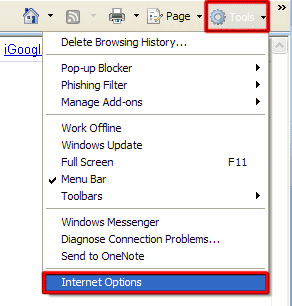
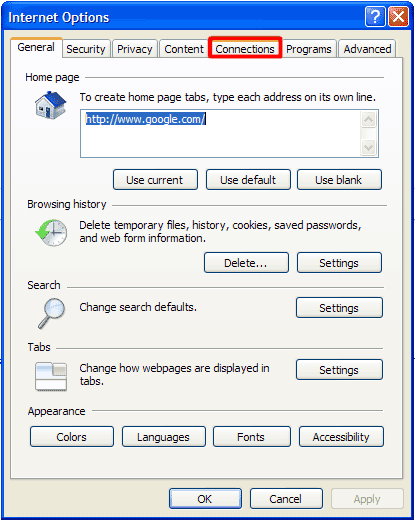
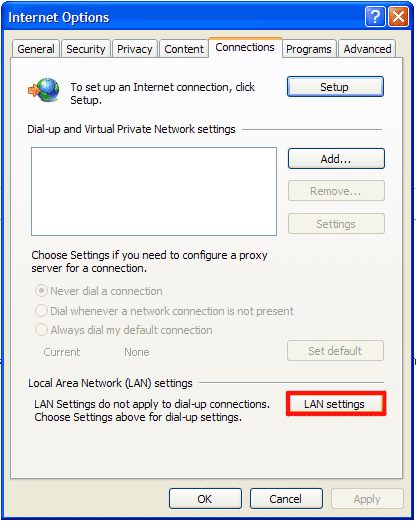
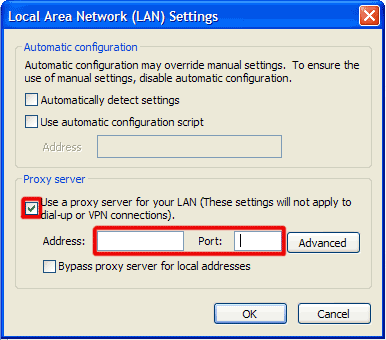
How to renew your internet connection:This rogue antispyware blocks your Internet connection to prevent you from removing the rogue application. To enable the Internet connection, please follow these instructions:
| ||||||||
|
Download Spyware Removal Tool to Remove*
Vista Defender 2013
| ||||||||
|
|
- Blocks internet connection
- Block exe files from running
- Installs itself without permissions
- Connects to the internet without permission
- Slow internet connection
- System crashes
- Annoying Pop-up's
- Slow Computer
How to manually remove Vista Defender 2013
Files associated with Vista Defender 2013 infection:
%UserProfile%\AppData\Local
LZClient.exe
k314q0pa.exe
Java.exe
wmptc64.exe
windows7manager.exe.exe
fixIQSS.exe
regx32.exe
nvappx.exe
A-2068193475.exe
whost.exe
nbt.exe
2007backgammonpro53.exe
Dropbox.exe
%AppData%\[Random].exe
vmicsvvc.exe
AdvService.exe
Switchbotv3.exe
msudt.dll
mplayer_tuguu_1271[1].exe
billserver.exe
fastsrch.dll
21d .exe
PK.exe
Imgtask.exe
lmhost.exe
UtilZone.exe
winsszhost.exe
PSEXESVC.EXE
Asian Injector.exe
Youwave.Android.v2.x.x.Generic.patch-RES.exe
msdcsc.exe
logs.exe
074.exe
Bla Bla.exe
qtwm.exe
PIC001gpj.exe
wsearch.exe
%UserProfile%\Local Settings\Application Data
service.exe
mlkaaxwd.exe
RegistryMighty.exe
wincmd.exe
11.exe
AplicacionSistema (1).exe
msess.exe
ro8.exe
faberge80.exe
System.exe
ovowwgw.exe
zeqcoc.exe
sp.DLL
msvcrt.exe
mqgka.exe
spsreng.exe
winmgr.exe
lsass.exe
pdoubrhgfjkxeiqndts.exe
tray_cd.exe
iSvchost.exe
TMf2g99RPH1P2EI.exe
90BC71.exe
Update Services.exe
pcsafedoctor.exe
sdsvc.exe
CertPolEng.exe
TicnoTabsBho120605.dll
Intel.exe
setup.exe
ivkyr.dll
vmnethcp.exe
mpk.exe
NZellTV_update.exe
Boonty.exe
syshost.exe
voicetunerserver.exe
hosts.exe
uaccache.exe
windbug.exe
ltr12.exe
update.exe
MsCtfMonitor.exe
n.
KBDINKKAN.DLL
IZ Crypt Pre Alpha.exe
syscron.exe
searchindexe.exe
IMF.exe
liunhiu.dll
svcnet2.exe
Step1.exe
AdvTCApp.exe
DAP.EXE
bhoclass.dll
musicoasis.exe
lollipop.exe
dotms.exe
networkhelp.exe
mszawz.exe
fiffdxqu.exe
akl.exe
Anadolu Crypter.exe
Vista Defender 2013 DLL's to remove:
ivkyr.dll
bhoclass.dll
liunhiu.dll
TicnoTabsBho120605.dll
msudt.dll
Vista Defender 2013 processes to kill:

spsreng.exe
Boonty.exe
Youwave.Android.v2.x.x.Generic.patch-RES.exe
whost.exe
logs.exe
Imgtask.exe
AdvService.exe
fixIQSS.exe
service.exe
CertPolEng.exe
setup.exe
winmgr.exe
Anadolu Crypter.exe
billserver.exe
dotms.exe
nvappx.exe
Switchbotv3.exe
k314q0pa.exe
msdcsc.exe
iglsldvx.exe
musicoasis.exe
mplayer_tuguu_1271[1].exe
mlkaaxwd.exe
winsszhost.exe
mqgka.exe
searchindexe.exe
Step1.exe
syscron.exe
sdsvc.exe
Dropbox.exe
networkhelp.exe
LZClient.exe
regx32.exe
msvcrt.exe
IZ Crypt Pre Alpha.exe
MsCtfMonitor.exe
fiffdxqu.exe
update.exe
windows7manager.exe.exe
hosts.exe
ltr12.exe
lmhost.exe
AplicacionSistema (1).exe
faberge80.exe
Asian Injector.exe
Java.exe
Intel.exe
nbt.exe
pdoubrhgfjkxeiqndts.exe
vmnethcp.exe
AdvTCApp.exe
mszawz.exe
RegistryMighty.exe
ro8.exe
PK.exe
msess.exe
wincmd.exe
A-2068193475.exe
windbug.exe
uaccache.exe
2007backgammonpro53.exe
pcsafedoctor.exe
mpk.exe
ovowwgw.exe
syshost.exe
074.exe
voicetunerserver.exe
%AppData%\[Random].exe
11.exe
wsearch.exe
svcnet2.exe
qtwm.exe
akl.exe
iSvchost.exe
lollipop.exe
vmicsvvc.exe
Bla Bla.exe
wmptc64.exe
System.exe
UtilZone.exe
PIC001gpj.exe
tray_cd.exe
Update Services.exe
lsass.exe
TMf2g99RPH1P2EI.exe
NZellTV_update.exe
zeqcoc.exe
21d .exe
IMF.exe


Post comment — WE NEED YOUR OPINION!